Showing posts with label design kit. Show all posts

Friday, May 17, 2013

design kit // google images


Hello everyone! Welcome to my new Friday editorial: Design Kit. This week a friend designer and I talked about how difficult it is sometimes to find the real owner of an image in order to give proper credit, so I told her how I look for them when I find myself in that situation. I use my favorite image research tools: Google Images. 

Google Images not only allows you to search for images that match a exact word or phrase...

just type the word or phrase on the search bar...

...to get thousands of images that match the criteria you enter: ideal for inspiration research

...it also allows you to do a search using a specific image.

click on the camera icon on the right of the search bar

decide whether you want to look for it using an image's url or selecting it from your computer

on safari you can only browse for the image and choose it

while on chrome and firefox, you can also drag the image from the folder on your computer and drop it in the search bar

What's awesome about this tool is that you not only get the pages that include the exact same image you've used to do your search, but also shows you alike images (perfect to easily build moodboard with similar visual inspiration), and best guesses for the image (so websites that probably talk about themes related to the visual search).


You can also use it to look for your own work and see who else has shared it or find resembling examples. 


Now it's time to start playing... you'll soon fall in love with this tool and add it to your own Design Kit!

Friday, May 10, 2013

design kit // design seeds


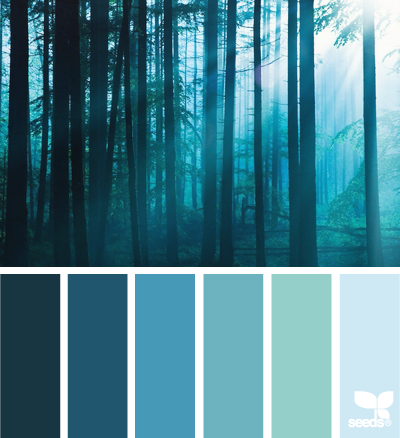
Hello everyone! Welcome to the second post of my new Friday editorial: Design Kit. Today I want to show you one of my favourite colour inspiration websites: Design Seeds, an online collection of beautiful imagery and colour palettes. It was created by Jessica in 2009, but I discovered it only early this year. What I like about her palettes, is that each of them is accompanied by a fabulous picture that adds to the inspirational effect. Jessica buys the photos from professional photographers and then extracts the colours she wants to create an harmonious palette that can be used by us entirely or in parts to design our own work.


In addition, she's created a wonderful search tool that allows you to look for exactly the kind of palette you want. You can search by specific colour value or theme, choose the one you want and download it to your computer… isn't it handy? On top of this cool feature, she has also collected many of these images on cute mini and affordable books that make perfect additions to any designer's or colour maniac library.


Color is essential to a designer's success, and it isn't easy or not always we have the time to come up with nice combinations. Design Seeds is an amazing source of inspiration, not only for colour combos but also the pictures that come with them, and that's why it can't miss in my Design Kit. See you Sunday with a new Mani Sunday and my first #52collections work. In the meantime, enjoy some of my favourite seeds :)


*all images belong to and were taken from Design Seeds

Friday, May 3, 2013

design kit // springpad


As part of my new editorial schedule, Friday will be dedicated to websites, apps, and tools that I consider will help most designers get the work done. The idea is to slowly build up a Design Kit filled with goodies :)


I want to start with my new favourite online app: Springpad, a tool to organise your info, bookmarks, pics and more. I like to think of it as the baby between Dad Evernote and Mom Pinterest: it has the methodic order of dad and the looks and social skills of mom ;) I consider it my own virtual sketchbook library. 


Info is organised in notebooks: you can create as many as you want and choose whether to keep them public or private (in Pinterest secret boards are limited to 6 per account, Springpad has no limit… good uh?). The notebooks are so pretty: you can even choose the type of cover and binding colour you want. 


I like that I can add as many things as I want and don't have to worry about a space limit like in Evernote, and I can really just save whatever I need in that moment.

Write a note, save a pic, bookmark a new website, or write your weekly to-do list. You can really do whatever you want with your Springpad notebooks ;)

Springpad also has a nice community (similar to that in Pinterest), but you don't get lost in the thousands of nice images and interesting pins like you do in Pinterest (which can sometimes, be overwhelming and chaotic), nor you get sucked in everyone else's activity. I still love Pinterest and I use it too, but more as an online gallery than as my go-to idea-saver.

you can explore the community and follow the notebooks you are interested in

One more thing I like is that you can add tags to your springs (Pinterest calls them pins, Evernote, clips, and Springpad, springs) so you can find them easily by simply choosing or searching a specific tag. I have almost 100 Pinterest boards with lots of good ideas and tutorials and recipes, but I'm never able to find what I want unless I go through the hundreds (maybe thousands) of pins I have… very time consuming and annoying. 

Finally, I like that you can embed your library or a certain notebook to your blog or website for others to have access to without having to register or go to Springpad. I've decided to use this option to embed my SPD contests + challenges notebook here, so that anyone can have access to the current deadlines and opportunities (you can check it out clicking the +spd deadlines+ button in the top menu). I'm glad to keep that info publicly available, so whenever you want to know about the latest contests, just stop by and take a look at it. Also, if you know of an opportunity I haven't added, just let me know about it with a comment and I'll make sure to spring it! 

I used to use Visualize.us, Delicious, and Evernote, but I finally feel I can do the same and more with just one app. Springpad is the set of sketchbooks I keep in handy whenever I need them to save ideas, inspiration, or any other info I might need later. I can access them from my computer, iPhone or iPad and have always available and organised my info and resources. That's why Springpad cannot miss in my Design Kit!

What about in yours? Let me know what you think :P